How to Calculate Churn Rate
There isn't just one way to calculate churn rate. The exact formulas for customer churn, revenue churn, net revenue churn, and NRR — with simple worked examples.

There isn't just one way to calculate churn rate.
SaaS companies typically track three different churn metrics:
- Customer churn — how many customers you lost.
- Revenue churn — how much recurring revenue you lost.
- Net revenue churn — how churn compares to expansion revenue from existing customers.
Each metric tells a different story about the health of your business.
In this guide, we'll show the formula for each one and walk through simple examples.
Customer Churn Rate
Customer churn rate measures how many customers stopped paying during a given period.
Formula

Example
Let's say you start the month with 1,000 customers.
During the month, 40 customers cancel.
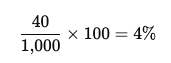
Your customer churn rate is 4%.
Customer churn is useful when you want to understand how many customers you're losing, regardless of their subscription size.
Revenue Churn Rate
Not all customers generate the same amount of revenue.
Losing one large account can have a bigger impact than losing several smaller ones.
That's why many SaaS companies also track revenue churn.
Formula

Example
You start the month with $100,000 in MRR.
During the month, you lose $5,000 in MRR from cancellations.
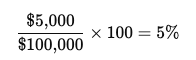
Your revenue churn rate is 5%.
Revenue churn shows how much recurring revenue is leaving your business.
Net Revenue Churn
Net revenue churn takes things one step further.
Instead of looking only at lost revenue, it also includes expansion revenue from existing customers through upgrades, additional seats, or higher-tier plans.
Formula

Example
You start the month with $100,000 MRR.
During the month:
- You lose $5,000 MRR from cancellations and downgrades.
- Existing customers add $7,000 MRR through upgrades.
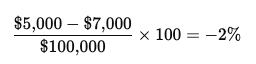
Your net revenue churn is -2%.
A negative result means your existing customers expanded faster than revenue was lost.
What About Net Revenue Retention (NRR)?
Net Revenue Retention (NRR) is closely related to net revenue churn.
Formula
NRR = 100% − Net Revenue Churn
Using the example above:
100% − (-2%) = 102%
Your NRR is 102%.
An NRR above 100% means your existing customer base is growing even before you add new customers.
Which Churn Metric Should You Track?
Each metric answers a different question:
- Customer churn → How many customers left?
- Revenue churn → How much revenue was lost?
- Net revenue churn → Is expansion offsetting churn?
- NRR → Is your existing customer base growing or shrinking?
Most B2B SaaS companies track all four, but NRR is often the headline metric because it reflects the overall health of recurring revenue.
Final Thoughts
Calculating churn rate is straightforward once you know which metric you're measuring.
Start with customer churn if you want to track customer retention. Add revenue churn to understand revenue loss. Then track net revenue churn and NRR to see the full impact of cancellations, downgrades, and expansions.
As your SaaS business grows, calculating these metrics manually becomes harder—especially when you have multiple plans, upgrades, downgrades, and customer segments.
Bigdelta automatically calculates customer churn, revenue churn, net revenue churn, and NRR from your subscription and payment data, helping you monitor retention without building complex spreadsheets.